


The biggest fear for new dropshippers isn’t finding a product—it’s the panic of the “What now?” moment after someone pays. A shopper buys a blue yoga mat, but because you are exhausted from your day job, you copy-paste the wrong address to your supplier. That single typo ruins the customer experience. Mastering dropshipping order management protects the thrill of a sale from the crushing stress of manual mistakes. Best way to find the dropshipping order management.
According to e-commerce industry studies, the highest risk for failure lies within the order-to-cash cycle, which is the complete journey from a customer checking out to the physical package arriving. Handling this relay race by hand works initially, but manual fulfillment quickly becomes a data entry nightmare. In supply chain management, simple human errors mean lost boxes and angry refund requests. Transitioning to automated fulfillment solves this entirely by allowing software to silently send exact order details to your supplier without you lifting a finger.
Hitting that checkout button is truly just the beginning of the transaction. Navigating these hidden complexities prevents the high financial cost of fulfillment errors. Building a reliable system safely delivers packages while giving you your free time back.
Table of Contents
The Waiter Analogy: Demystifying the Order-to-Cash Cycle
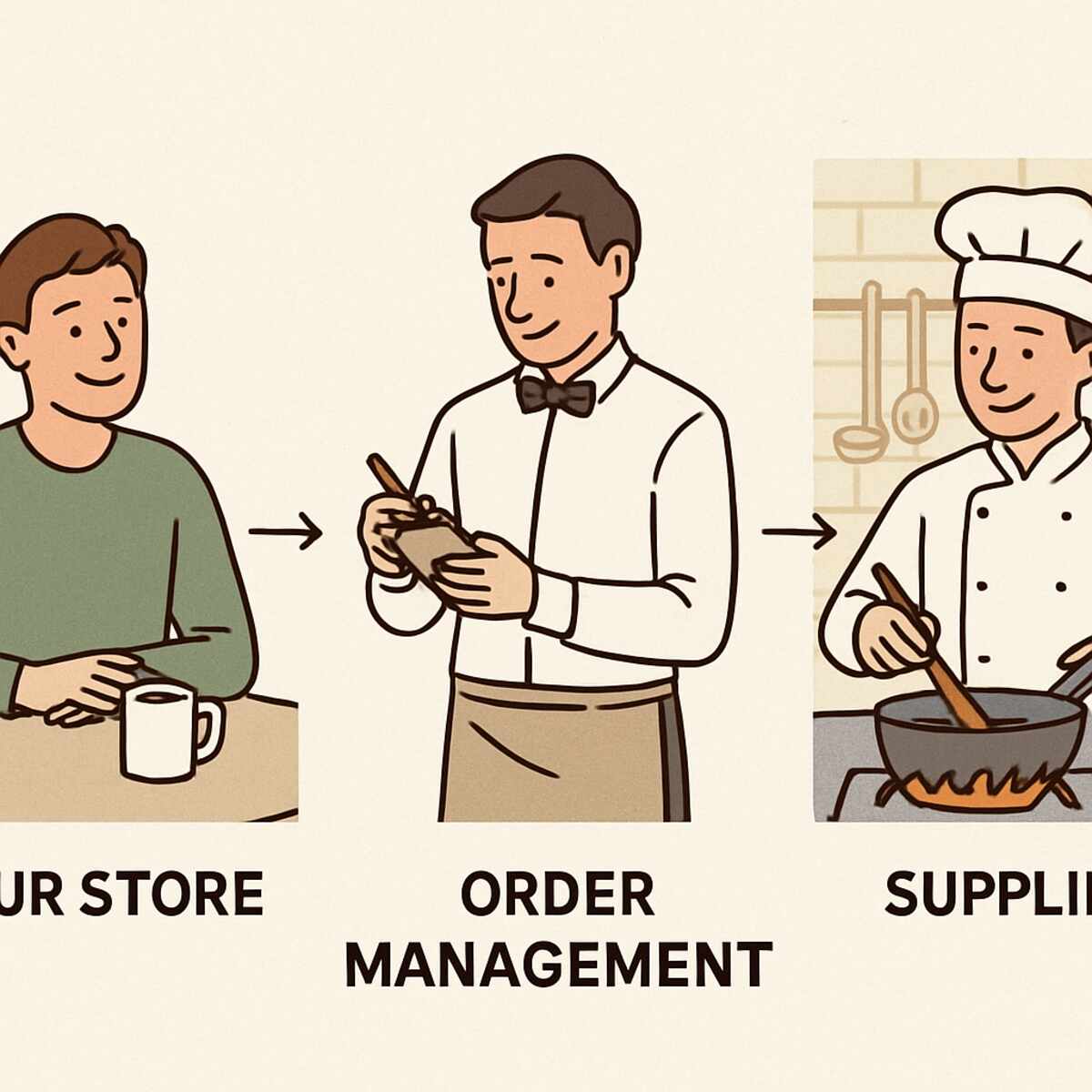
Picture a busy restaurant where a diner (the customer) gives their order to a waiter (the retailer), who hurries the ticket back to the chef (the supplier). You never expect the waiter to actually cook the food, but they must deliver the exact instructions to the kitchen so the meal arrives fast. This exact same relay happens in your online store. When someone buys a yoga mat from your website, the digital flow of data moves exactly like that physical restaurant ticket, traveling from the buyer to you, and finally to the warehouse.
Because you never touch the physical product, your business relies entirely on how efficiently you pass that digital note. In e-commerce, this journey from the moment a buyer clicks “Pay” to when the supplier actually ships the package is called the Order-to-Cash cycle. Mastering dropshipping order management means setting up a system where this handoff happens automatically without your constant supervision. Your software takes over the waiter’s job, instantly pinging the supplier’s warehouse so they can grab the right box off the shelf.
The primary goal of streamlining the order-to-cash cycle is simply reducing the time between a customer’s payment and a package arriving on their porch. When this process moves quickly, customers are thrilled and suppliers get to work immediately. Unfortunately, many new sellers try to handle this relay race themselves, manually copying and pasting shipping addresses late at night. This exhausting approach often breaks down as sales grow, leading us straight into Mistake 1: The Manual Data Entry Trap and the Cost of Human Error.
Mistake 1: The Manual Data Entry Trap and the Cost of Human Error
Getting your first sale feels incredible, making the act of typing a customer’s shipping details into your supplier’s website feel like a victory lap. Yet, the “fatigue factor” sets in hard when fifteen people buy pet bowls overnight. That excitement quickly becomes a grueling chore of copy-pasting zip codes. This breaking point forces sellers to evaluate manual vs automated fulfillment strategies—the methods used to coordinate delivery to the buyer.
A simple typo in e-commerce costs real money. If you accidentally type “Main St” instead of “Main Blvd,” the physical box bounces back, forcing you to pay for a replacement out of pocket. Professionals avoid this using address validation, a software feature that checks the buyer’s location against official postal databases to guarantee the home exists.
Slow human typing is also the leading cause of shipping delays. When your supplier waits for you to manually send over order details, that package sits frozen until you finish your day job. Proper dropshipping order management removes you as the bottleneck entirely, instantly forwarding those validated addresses to the warehouse while you sleep.
While protecting your profit margins from typos is crucial, perfect data entry only solves half the equation. Even if you transmit a flawless shipping label in record time, the entire system crashes if the warehouse shelf is empty. That scenario introduces a completely different nightmare, leading us directly into Mistake 2: The Ghost Inventory Crisis and How to Prevent Overselling.
Mistake 2: The Ghost Inventory Crisis and How to Prevent Overselling
A customer eagerly buys a yoga mat from your store, only to discover your supplier actually sold their last one three hours ago. Ideally, your online store should act like a mirror to the supplier’s physical warehouse—if they empty a shelf, your website’s mirror must instantly show zero stock. When that mirror breaks, you end up listing “ghost stock,” which are items that appear available but no longer exist. Taking a customer’s money for these phantom items is called overselling, a nightmare scenario that forces you to send an embarrassing cancellation email and issue a refund.
Manually checking your supplier’s website every hour to avoid this is simply impossible once your product catalog grows. A dangerous “lag time” between what the supplier actually holds and what your store displays causes these frustrating inventory discrepancies, usually stemming from three common culprits:
- Other dropshippers buying the exact same supplier’s remaining stock before you do.
- Warehouse delays in updating their digital records after a busy weekend rush.
- Physical items getting damaged on the shelf without the online numbers being reduced.
Protecting your business from these blind spots requires a safety net, commonly called an inventory buffer. By configuring your store to show “Out of Stock” when the supplier claims they still have five items left, you create a cushion for preventing overselling in online stores even if their numbers are slightly wrong. This simple rule saves your reputation, but relying purely on static buffers won’t scale forever. Eventually, you need your store and supplier to communicate instantly, which brings us to the necessity of automated inventory syncing across channels.
How to Automate Inventory Syncing Across Multiple Sales Channels
Leaving manual updates behind feels great, but the challenge grows when you sell on multiple websites at once. If you list your phone cases on both your own website and a marketplace like eBay, those different platforms act as separate storefronts, known as sales channels. Keeping the numbers right across all these different storefronts requires automated inventory syncing across channels. Without automation, selling one phone case on eBay means you must quickly rush to update your personal website before someone buys the exact same missing item there.
Many beginners start by uploading a daily spreadsheet from their supplier, commonly called a CSV file, which acts like a printed snapshot of what was in the warehouse yesterday morning. Because this snapshot gets outdated the moment a supplier sells another item, you need a smarter bridge between your store and the warehouse. Specialized supply chain management tools exist exactly for this purpose, acting like a constant digital radio broadcast. Instead of waiting for a daily printed list, these software applications listen to the supplier’s warehouse systems second-by-second to catch changes immediately.
Setting up this continuous connection means plugging your store into an inventory feed. Think of a stock feed like a dedicated digital pipeline connecting your supplier’s backroom directly to your website’s display window. To connect your first feed, you simply install an inventory app on your store platform, paste the specific link provided by your supplier, and let the system run. Once linked, the software automatically drops your website’s stock numbers the moment the supplier’s shelf empties, completely eliminating the fear of selling thin air.
Now that your stock levels are accurate, you can finally celebrate when that next order notification chimes on your phone. However, getting the inventory right is only the first half of a successful dropshipping transaction. The moment a customer pays, they expect to know exactly where their physical package is and when it will arrive at their doorstep. Failing to pass this critical tracking information along triggers Mistake 3: The Silent Relay and Why Ghosting Customers After a Purchase Kills Loyalty.
Mistake 3: The Silent Relay and Why Ghosting Customers After a Purchase Kills Loyalty
We’ve all felt that sudden panic after hitting checkout on an unfamiliar website when no confirmation arrives. For modern shoppers, silence is instantly interpreted as a scam. Because your buyers cannot see the warehouse packing their items, they rely entirely on your communication for reassurance. Failing to provide immediate proof of purchase triggers a retail industry phenomenon called WISMO—an acronym for “Where Is My Order?”—which quickly floods your inbox with anxious messages.
Providing peace of mind actually matters more to a new buyer than overnight delivery speeds. Think of order tracking like a computer’s download progress bar; even if the wait is long, just seeing the bar move keeps people completely calm. By actively improving customer delivery transparency, you show buyers exactly when their new yoga mat or phone case leaves the supplier’s hands. This continuous visibility builds essential trust, transforming a nervous one-time purchaser into a relaxed, loyal fan who feels completely in the loop.
Stopping this panic starts the very second a payment processes on your digital storefront. Your immediate action step is ensuring an automated confirmation email lands in your customer’s inbox within seconds of their purchase to prove their money went to a real business. Once that initial receipt buys you some time, you must reliably pass along the physical shipping details without manually typing out long tracking codes every night. Getting these numbers directly from your supplier to your buyer is incredibly straightforward, as you will see in A Step-by-Step Guide to Automating Tracking Updates for Your Customers.
A Step-by-Step Guide to Automating Tracking Updates for Your Customers
The biggest time sink for new sellers happens right after the supplier hands a package to the post office. Manually digging through daily emails to copy and paste long tracking codes into your store is an exhausting, error-prone process. Setting up software to manage your order tracking eliminates this tedious chore entirely. By removing manual data entry, you instantly save two to five minutes per order while ensuring you never accidentally mistype a crucial digit.
Think of this automation as a dedicated digital assistant waiting at your supplier’s loading dock. When a warehouse creates a shipping label for a pet bowl, this assistant grabs the tracking information instantly. It then formats the raw carrier data into a clean, clickable link. This small detail is vital; it ensures your buyer can tap a single button on their phone to find their box, rather than forcing them to copy a code and hunt down the carrier’s website.
Automating order tracking updates requires connecting your storefront to a management app that runs a seamless three-step relay race:
- Supplier Generates: The warehouse packs the physical item and creates a shipping label code.
- App Pulls: Your connected software detects this new code at the supplier’s facility and syncs it to your store.
- Customer Notified: The system automatically emails the buyer their live tracking link without you lifting a finger.
Master this automated flow, and delivering a single item becomes beautifully hands-off. However, this simple process quickly breaks down if a buyer orders a phone case from one warehouse and a yoga mat from another, plunging you directly into Mistake 4: The Multi-Supplier Headlock and Managing Complex Workflows.
Mistake 4: The Multi-Supplier Headlock and Managing Complex Workflows
When a buyer places a phone case and a yoga mat into their cart and clicks “Buy”, those items might actually live in completely different warehouses. Fulfilling this manually usually means emailing the entire order to both vendors, confusing everyone involved. Mastering the art of managing multi-supplier fulfillment workflows prevents one supplier from accidentally trying to ship a product they do not even stock.
To solve this logistical puzzle, your store needs a digital traffic cop to handle order routing. Instead of forwarding the whole receipt, smart software splits the paperwork behind the scenes. It automatically sends the phone case request to Warehouse A and the yoga mat request to Warehouse B. Routing these details automatically ensures each facility only sees the exact item they must pack.
Beyond confusing paperwork, these split orders hide a dangerous trap for your profit margins. Because items leave two distinct loading docks, you quietly pay two separate shipping fees while your customer likely only paid for one. Recognizing this hidden cost is crucial, as combining low-margin items from different vendors can actually cause you to lose money on a successful sale.
Protecting your profits means adjusting prices to absorb these dual charges before a customer even checks out. Once the financials are secure, you still face the reality that two boxes will arrive on different days. Handling split shipments from suppliers requires proactive communication. Navigating this successfully brings us directly to How to Handle Split Shipments Without Confusing Your Customers.
How to Handle Split Shipments Without Confusing Your Customers
The quickest way to ruin a great shopping experience is the dreaded “missing item” panic. When a buyer opens their mailbox to find only the phone case but not the yoga mat, they immediately assume you made a careless mistake. Managing split shipments from suppliers is actually an exercise in setting human expectations rather than just moving cardboard boxes.
Stopping this confusion requires you to speak up long before the checkout button is ever clicked. Taking a few minutes to update your storefront’s “Shipping Policy” page to clearly explain multi-package orders sets the right tone early. By stating upfront that different items might ship from separate specialty warehouses, you are actively improving customer delivery transparency and transforming a potential error into a sign of premium service.
After the sale happens, your next hurdle is passing the delivery information along without creating an inbox disaster. Rather than firing off multiple emails with different carrier links, you can use order software to create a shipment consolidation hub. This tool simply provides the buyer with a single, easy-to-read tracking web page showing exactly when each separate package is scheduled to arrive.
Master this communication, and you will completely eliminate those frustrated support emails asking where the rest of their purchase is. However, managing separate boxes is only half the battle when dealing with faraway vendors. You still have to figure out when those individual items will actually leave the facility, which leads directly to Mistake 5: Ignoring Supplier Lead Times and the Perils of Optimism.
Mistake 5: Ignoring Supplier Lead Times and the Perils of Optimism
Many new sellers look at a supplier’s catalog, see “3-day shipping,” and confidently promise their own customers a three-day turnaround. This optimism is a guaranteed way to earn terrible reviews. Sellers often confuse the time a package spends moving with the total “lead time”—the complete journey from the moment a buyer clicks purchase to the moment they open the box. Assuming a best-case scenario ignores the physical reality that warehouses do not pack orders the exact second they arrive.
To avoid disappointing buyers, you must break every delivery down into its three distinct phases. Think of it like ordering at a restaurant: eating your meal takes a specific amount of time, but the kitchen still has to cook it first. In dropshipping, your true timeline involves:
- Processing Time: The days it takes a supplier to print a label, grab the item off a shelf, and tape up the box.
- Transit Time: The actual journey across the country in a freight truck or airplane.
- Last-Mile Delivery: The final, sometimes unpredictable handoff from the local post office to the front porch.
Because of these moving parts, you should always add a 2-day “buffer” to the shipping speeds you advertise on your website. Building this cushion into your overall supply chain management keeps expectations realistic and saves you from constantly apologizing for late packages. Once you establish these honest timeframes, your daily routine will naturally shift toward monitoring supplier lead times and performance to predict and prevent shipping delays from happening in the first place.
Monitoring Supplier Performance to Predict and Prevent Shipping Delays
Understanding delivery phases is only half the battle; the rest requires actively monitoring supplier lead times and performance. Think of your supplier as a silent business partner. If they suddenly take five days to pack a simple phone case instead of two, your customers will blame you, not the warehouse. You cannot leave your reputation up to chance, meaning you need a system to evaluate how well these partners actually operate behind the scenes.
The simplest way to track this reliability is by creating a “Supplier Scorecard.” Just like a school report card, this basic spreadsheet grades vendors on key performance metrics. You should track their average packing speed, stock consistency, and message response times. If a supplier promises a 48-hour turnaround but consistently takes four days to issue a tracking number, this scorecard highlights the failure immediately rather than letting it slip by unnoticed.
Spotting these negative trends early helps you identify red flags before they ruin a busy holiday season. When you notice slipping grades, you can start resolving shipping delays with vendors directly by showing them your proof. If they refuse to improve, that hard data tells you exactly when to fire them and switch to a backup supplier, ultimately protecting your store’s customer trust.
Keeping your suppliers accountable drastically reduces late packages and angry emails. However, even the most flawless warehouse operation cannot prevent a buyer from simply changing their mind once a package arrives. When that inevitably happens, you need a plan to avoid getting trapped in Mistake 6: The Returns Black Hole and Building a Risk-Free Refund Policy.
Mistake 6: The Returns Black Hole and Building a Risk-Free Refund Policy
Waking up to a customer email asking to send back a defective yoga mat creates an immediate logistical nightmare. In a traditional store, you simply tell them to ship it back to your warehouse, but as a dropshipper, you do not actually own a warehouse. Dealing with physical goods you never physically touch requires a strategic approach. Many beginners assume they can just copy and paste a massive retailer’s refund rules, completely ignoring how those systems break down without a physical stockroom.
Using a “standard” storefront policy is dangerous because it ignores the costly reality of handling dropshipping returns and refunds. If your supplier is based overseas, forcing a customer to mail a twenty-dollar pet bowl back across the world will often cost more in postage than the bowl itself. The buyer gets angry about the expensive shipping fees, you lose your profit margin, and the foreign warehouse might reject the opened package anyway.
This friction leads straight into the classic “Return to Supplier” versus “Return to Me” dilemma. You must decide whether to route the unhappy buyer back to the original vendor or just have them mail the unwanted item straight to your own front door. Moving a product backward through the system—a process supply chain management experts call reverse logistics—is rarely as smooth as sending it out the first time.
Every successful online store eventually faces customers who change their minds or receive broken items. Instead of panicking when that first refund request hits your inbox, you need a proactive system that protects your profits without frustrating your buyers. Fortunately, there are proven ways to bypass this headache entirely, leading us directly into Practical Strategies for Handling Dropshipping Returns Without Inventory.
Practical Strategies for Handling Dropshipping Returns Without Inventory
Handling dropshipping returns and refunds without drowning in postage fees requires matching your store’s policy directly to your supplier’s actual capabilities. If your vendor will not accept an opened phone case, you cannot promise your buyer a hassle-free exchange. Resolving these transactions efficiently means having a clear roadmap prepared for the moment things go wrong.
Rather than guessing, successful sellers rely on three distinct methods to resolve these issues without ever touching the product:
- The Returnless Refund: For low-cost items like a $5 pet bowl, simply refund the customer’s money and tell them to keep or donate the item. You lose the product cost, but you save the expensive return shipping fee and instantly create a happy customer.
- The Local Warehouse (3PL): A 3PL, or Third-Party Logistics provider, is a hired facility in your customer’s country. Instead of mailing a heavy yoga mat back overseas, the buyer ships it to your local 3PL, who inspects and holds it to fulfill your next local order.
- The Supplier Return: Use this only if your supplier provides a pre-paid shipping label. You act as a relay, passing the supplier’s return label directly to your buyer.
Draft your storefront return policy today based on which of these three paths fits your inventory best. Once your safety net for unhappy customers is fully built, you can safely focus on multiplying your daily sales without fear of logistical roadblocks. This growth requires handling higher volumes efficiently, leading into Scaling Operations with Automated Purchase Orders.
Scaling Operations with Automated Purchase Orders
Getting your first few sales is thrilling, but copying customer addresses into your supplier’s website one by one quickly becomes a daily chore. Think of it like a waiter running to the kitchen every time someone orders a glass of water, rather than taking a whole table’s requests at once. You will hit a natural scaling point around twenty sales a day, where manual typing inevitably causes delayed shipments and costly typos.
Fixing this bottleneck requires moving to bulk fulfillment, which simply means compiling all your daily customer purchases and paying for them in one single batch. Without a proper system, checking out fifty phone case orders takes two hours of mindless clicking. By implementing smart dropshipping order management, those same fifty transactions can process in just two minutes.
The secret behind this massive time-saver is the Purchase Order (PO), a formal digital document telling your supplier exactly what to pack and where to send it. Instead of confusing your vendor with dozens of scattered email requests, scaling operations with automated purchase orders provides them with one clean, easily readable spreadsheet. Because the warehouse staff can read a standardized PO quickly, they pack your boxes faster and with significantly fewer mistakes.
Building these daily automated workflows means you can finally step away from your computer while the business handles the heavy lifting. To achieve this smooth handoff, you must pick the right software to act as your reliable digital manager, leading perfectly into exploring ERP Systems vs. Small Business Apps: Choosing Your Logistic Engine.
ERP Systems vs. Small Business Apps: Choosing Your Logistic Engine
Most sellers start by connecting simple Shopify or Amazon apps to handle basic dropshipping order management. Think of this like hiring separate freelance specialists for different tasks, where one person only watches the door while another only counts the money. This piecemeal approach works initially, but a complexity threshold eventually hits when these separate programs stop communicating. If your supplier runs out of yoga mats and your inventory app delays alerting your storefront, you end up selling products that do not actually exist.
Solving this breakdown introduces sellers to an ERP, or Enterprise Resource Planning system. Imagine an ERP as a master control room, combining your inventory, finances, and supplier data into one synchronized brain. Instead of duct-taping five different apps together, this all-in-one software ensures that if a warehouse worker drops a box, your financial dashboard instantly registers the loss.
Because these master systems are incredibly powerful, they carry hefty price tags that can quickly overwhelm growing budgets. Upgrading to ERP systems for small business logistics is tempting, but high monthly fees can completely wipe out your profit margins on everyday goods. As a strict rule, stick to your cheaper individual apps and avoid buying an ERP until you consistently process at least 100 orders a day.
Protecting your budget from expensive software costs is vital, but other hidden expenses can still quietly drain your bank account. Once your logistics engine is properly sized, you must look closely at how the customer’s money actually moves to your supplier. This requires addressing The Hidden Profit Leak: Minimizing Transaction Fees in Global Fulfillment.
The Hidden Profit Leak: Minimizing Transaction Fees in Global Fulfillment
Just like buying coffee on vacation where your bank charges a foreign transaction fee, buying inventory from international suppliers triggers cross-border fulfillment costs. Even if you carefully calculate your profit margins, currency conversion fees act as a “Silent Loss.” Every time you pay an overseas vendor for a phone case or pet bowl, standard banks take a quiet 3% cut. Over a single month, these hidden charges can easily swallow hundreds of dollars of your profit.
Stopping this leak requires changing how you pay. Smart sellers protect their margins by opening multi-currency business accounts, which act like a digital wallet holding different global currencies. You can start minimizing transaction fees in cross-border fulfillment using three simple strategies:
- Local currency accounts: Pay suppliers directly in their native money to completely bypass standard bank exchange fees.
- Bulk payments: Combine your daily orders into one weekly payment, reducing per-transaction flat fees.
- Transfer services: Use specialized online processors that offer cheaper wholesale exchange rates instead of expensive retail ones.
Switching to a payment method that avoids retail exchange rates instantly keeps more cash in your pocket. Just as a physical store owner wouldn’t knowingly throw away coins, you shouldn’t let bad payment setups drain your online margins. Once your financial pipeline is secure and profits are protected from currency leaks, your next priority is making sure the products actually arrive. When an overseas warehouse inevitably falls behind, you must understand Resolving Shipping Delays with Vendors: A Communication Framework.
Resolving Shipping Delays with Vendors: A Communication Framework
The dreaded “Where is my order?” email usually triggers panic, but first, determine what actually went wrong. Think of transit like a road trip: sometimes the car breaks down (a lost package), and sometimes it is simply stuck in traffic (a delayed package). A tracking link without recent updates often means a phone case is just sitting in a customs bin awaiting a scan. Successfully resolving shipping delays with vendors starts by confirming if the box is moving slowly or has vanished entirely.
Once you confirm a delay, contacting your supplier requires finesse. Because you rely on them to physically pack your goods, burning bridges helps no one. Instead, use a “Gentle Pressure” approach by framing the problem as a team effort. Simply ask them to help investigate an unusually long transit time, which prompts them to contact their local carrier without feeling attacked or blamed.
Watching these hiccups helps evaluate your overall supply chain management. Every seller handles late packages during a massive holiday rush—that is just a one-time fluke. However, if shipments of pet bowls consistently sit in a warehouse for a week before ever getting a tracking label, you are dealing with a chronic failure. Spotting this pattern early lets you find a backup supplier.
Navigating vendor conversations keeps your operations healthy, but your buyer is still waiting in the dark. While the warehouse investigates, you must manage buyer expectations so they don’t immediately demand a refund. Keeping them calm requires shifting focus toward Improving Customer Delivery Transparency Through Better Data.
Improving Customer Delivery Transparency Through Better Data
Waiting for a delayed package feels like sitting in a restaurant without seeing the kitchen. The easiest way to stop buyers from panicking is by giving them a clear view of the process, which is why improving customer delivery transparency matters. Instead of forcing customers to ask for manual updates, you can provide self-service tools that let them check their order tracking status whenever they want.
When you send a buyer to a random carrier’s website, you lose their attention completely. By installing a tracking portal directly on your storefront, you keep the customer engaged with your brand. Because they stay on your website to track the box, they are much more likely to browse your other products while they wait.
Automated updates act as your digital messenger, and the format you choose changes the buyer’s experience. While emails are great for digital receipts, SMS text updates hold a much higher reassurance value for anxious shoppers. A quick text message feels like a personal update from a helpful friend, so it immediately lowers the buyer’s stress levels.
Your most powerful tool for building trust is an automated “Out for Delivery” alert sent directly to their phone. Setting this specific notification ensures your customer knows exactly when to check their porch, which prevents stolen packages and reduces panicked support tickets. Once you master keeping the customer informed, you can build the backend systems that make these updates possible by Streamlining the Daily Workflow: From Order Received to Package Delivered.
Streamlining the Daily Workflow: From Order Received to Package Delivered
Waking up to fifty overnight sales is an exciting milestone. While automated tracking texts keep buyers relaxed, your backend dropshipping order management system must now start a 24-hour race to get those boxes moving. The secret to surviving this cycle is turning chaotic reactions into a predictable routine.
Instead of jumping at every phone notification, successful sellers use a batch processing mindset. Think of baking cookies; you would never mix and bake one single cookie at a time. Logging in just twice a day to forward all pending orders to your supplier simultaneously reclaims hours of your valuable time.
Reviewing these daily groups lets you perform a quick workflow audit before anyone actually ships a box. Rather than analyzing single receipts, you scan your dashboard in bulk to spot obvious mistakes like missing zip codes or misspelled streets. Catching typos early is key to streamlining the order-to-cash cycle, ensuring that money flows smoothly from the customer’s wallet to the supplier.
Even with software handling the repetitive steps, a few situations still require a human touch. When a supplier runs out of inventory or a customer begs for a last-minute address change, your personal intervention saves the sale. Once this daily rhythm feels effortless, you can safely prepare for larger order volumes by exploring Your Future-Proof Fulfillment Roadmap: Stress-Testing for Growth.
Your Future-Proof Fulfillment Roadmap: Stress-Testing for Growth
Fulfillment is the true engine of your store. Mastering the core principles of accuracy, speed, and communication transforms potential chaos into a reliable, automated process.
Turn this new knowledge into momentum by committing to a strict “No-Manual-Entry” rule for the next 30 days. Follow this checklist to build out your system:
- Week 1 (Audit): Map out every step a package takes from checkout to delivery.
- Week 2 (Tools): Connect your store directly to automated supplier software.
- Week 3 (Automation): Turn on automatic tracking updates for your customers.
- Week 4 (Scaling): Prepare your system to handle multi-item orders.
Before going live, put your setup through a Stress Test by simulating 50 orders in your system today. Watch how the software handles the heavy lifting, proving that your supply chain management won’t buckle under a sudden rush of sales.
Logistics might feel intimidating at first, but they are the sturdy foundation of a real, lasting business. Start trusting your automated systems, and you will finally have the freedom to focus on growing your store instead of just running it.
